イメージを文章説明付でフェイドイン・アウト表示させるJSライブラリ s3Slider
更新日:2008年12月1日|公開日:2008年12月1日
イメージを文章説明付でフェイドイン・アウト表示させるJSライブラリであるs3Sliderが便利そうなのでご紹介しようと思います。
spanで記述した文章を上・下・左・右に配置することができるので、ページのメインイメージなどにFLASHののような動きのあるビジュアルイメージをHTMLコードだけで配置できます。また、s3SliderはjQueryのプラグインなのでjQueryを主に使用している方には便利だと思います。
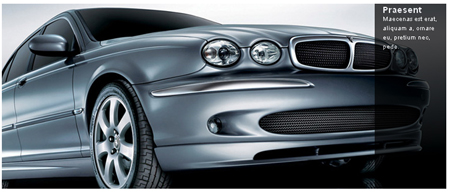
コードは非常にシンプルで下記のような感じです。
header
<script src="js/jquery.js" type="text/javascript"></script>
<script src="js/s3Slider.js" type="text/javascript"></script>
HTML
<div id="s3slider">
<ul id="s3sliderContent">
<li class="s3sliderImage">
<img src="#" />
<span>Your text comes here</span>
</li>
<li class="s3sliderImage">
<img src="#" />
<span>Your text comes here</span>
</li>
<div class="clear s3sliderImage"></div>
</ul>
</div>
CSS
#s3slider {
width: 400px; /* important to be same as image width */
height: 300px; /* important to be same as image height */
position: relative; /* important */
overflow: hidden; /* important */
}
#s3sliderContent {
width: 400px; /* important to be same as image width or wider */
position: absolute; /* important */
top: 0; /* important */
margin-left: 0; /* important */
}
.s3sliderImage {
float: left; /* important */
position: relative; /* important */
display: none; /* important */
}
.s3sliderImage span {
position: absolute; /* important */
left: 0;
font: 10px/15px Arial, Helvetica, sans-serif;
padding: 10px 13px;
width: 374px;
background-color: #000;
filter: alpha(opacity=70); /* here you can set the opacity of box with text */
-moz-opacity: 0.7; /* here you can set the opacity of box with text */
-khtml-opacity: 0.7; /* here you can set the opacity of box with text */
opacity: 0.7; /* here you can set the opacity of box with text */
color: #fff;
display: none; /* important */
top: 0;
/*
if you put
top: 0; -> the box with text will be shown at the top of the image
if you put
bottom: 0; -> the box with text will be shown at the bottom of the image
*/
}
.clear {
clear: both;
}

WEBサイトのUI/UXやSEO対策・AIO対策といったWEB関連が専門。
大阪のWEB制作会社でプランナー・ディレクターとして活動。
趣味はバンドでギター、ベース、ドラムなど。
キャンプや登山も好きでよく行ってます。